
Most people do not switch transcription tools because of one flashy feature. They switch because everyday work starts feeling slow: too much cleanup, too many export steps, and monthly costs that keep creeping up.
This comparison keeps the focus there. Not on marketing language, but on what changes in day-to-day use when you handle upload, speaker labels, and export deadlines in each product.
This comparison may include commercial considerations. Editorial criteria are listed below, including transcript export and subtitle workflow checks.
Method note: based on available product documentation and user-facing flows. No controlled lab benchmark was run for this update. Feature availability may vary by plan and region, including speaker labels, timestamps, and export options.
| Category | audio-to-text.online | HappyScribe | What this means in practice |
|---|---|---|---|
| Daily workflow speed | Focused, lightweight flow | Broader workspace, more steps | audio-to-text.online is usually faster for frequent transcript production. |
| Transcript cleanup effort | Low-to-medium in common use | Medium in common use | Both are solid, but audio-to-text.online tends to require less finishing time. |
| Subtitle workflow | Fast export flow for practical publishing | Broad format catalog | Trade-off: audio-to-text.online is faster for routine delivery, while HappyScribe offers wider format depth for specialized pipelines. |
| Translation workflow | Tight transcript-to-translation loop | Large localization stack | audio-to-text.online is simpler for everyday multilingual work. |
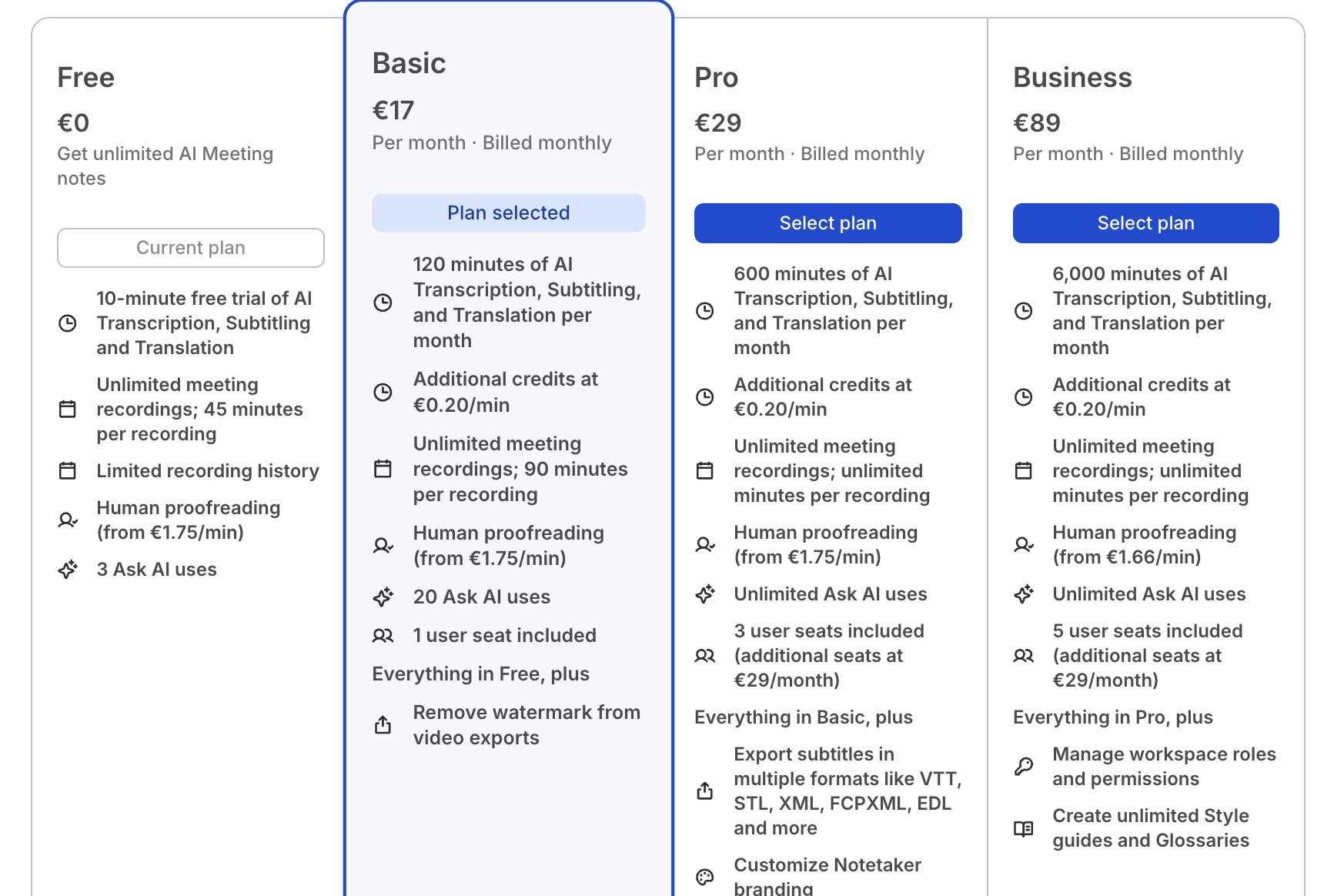
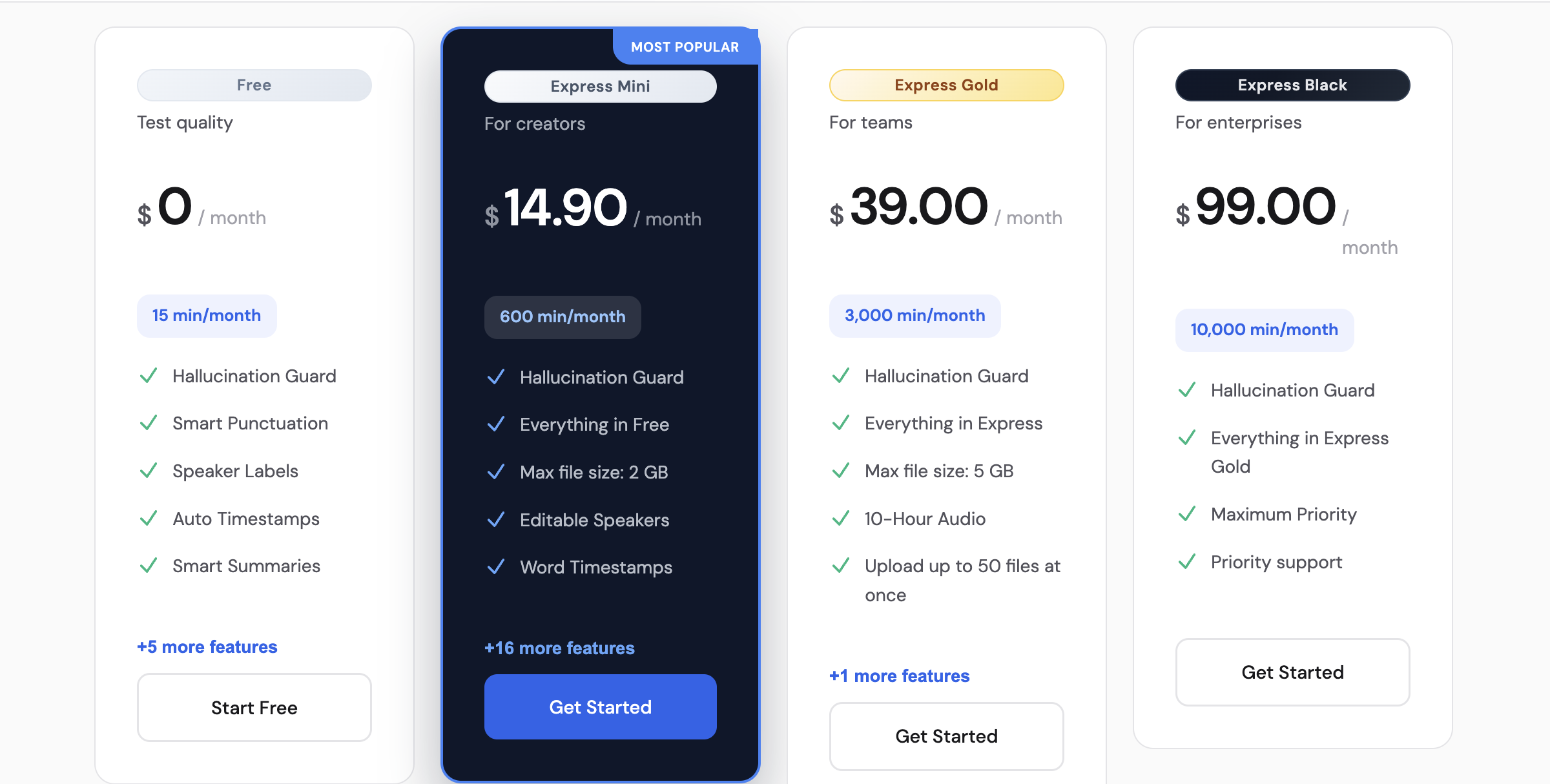
| Monthly value at 1000 min | $14.90 | $29 | audio-to-text.online is clearly cheaper at comparable minutes. |
| Scaling economics | $59 for 10,000 min | $89 for 6,000 min | audio-to-text.online offers stronger included-minute economics at high volume. |
Results can shift depending on audio quality, accents, speaker overlap, and how much editing the workflow requires. The blocks below are test templates, not claimed benchmark logs, so you can reproduce the decision with your own files.
Input profile: interview or podcast segment, 8-20 minutes, 2 speakers, occasional overlap, interruptions, and crosstalk.
What to evaluate: speaker separation stability, paragraph readability, punctuation consistency, timestamps quality, and time needed to reach publish-ready text.
What usually matters most: how fast quotes and clean paragraphs can be used without heavy manual restructuring.
Watch-outs: speaker switches during interruptions can create mis-labeled segments and extra correction passes.
Best choice if your priority is: faster transcript cleanup and simpler output loop, audio-to-text.online; deeper localization-oriented workflows, HappyScribe.
How to run this test in 10 minutes:
Input profile: real-life memo, 5-12 minutes, 1-2 speakers, background noise from traffic, cafe sound, or room echo.
What to evaluate: dropped words, punctuation drift, readability under noise, and how much cleanup is required before sharing.
What usually matters most: confidence in rough recordings when there is no chance to re-record.
Watch-outs: low-confidence words can chain into sentence-level cleanup overhead.
Best choice if your priority is: consistent day-to-day readability under mixed input, audio-to-text.online; broad downstream localization options, HappyScribe.
How to run this test in 10 minutes:
Input profile: one short clip (30-90s) plus one longer video segment (6-15 min), 1-2 speakers, normal editing workflow.
What to evaluate: SRT/VTT timing alignment, line-break quality, subtitle edit speed, and export friction by plan.
What usually matters most: getting publish-ready subtitles without re-timing every few lines.
Watch-outs: subtitle retiming effort and export constraints can erase any initial speed advantage.
Best choice if your priority is: quick subtitle turnaround in a repeatable workflow, audio-to-text.online; extensive format menus for edge delivery cases, HappyScribe.
How to run this test in 10 minutes:
Use this simple framework with your own files. Score each tool from 1 to 5 on:
Multiply time-to-final by 2, then total each tool's score. Pick the higher total for your workflow, not for a generic list.
These numbers use monthly billing, not annual discounts. That keeps the comparison grounded in real recurring spend.
Pricing/features can change; verify on official pages. Sources checked: happyscribe.com/pricing and audio-to-text.online/#pricing.
| Platform | Plan | Monthly Price | Included Minutes | Included Cost / Minute |
|---|---|---|---|---|
| audio-to-text.online | Express Mini | $14.90 | 1000 | $0.0149 |
| HappyScribe | Pro | $29 (or €29 by region) | 1000 | $0.0290 |
| audio-to-text.online | Express Gold | $39.00 | 3,000 | $0.0130 |
| HappyScribe | Business | $89 (or €89 by region) | 6,000 | $0.0148 |
| audio-to-text.online | Express Black | $59.00 | 10,000 | $0.0059 |
Both platforms can produce readable transcript drafts. In practical evaluation, editing time after the first pass is where differences become clear. If two people talk over each other, diarization quality impacts edit time more than raw WER.
Trade-off: audio-to-text.online usually feels faster to finalize; HappyScribe can still fit teams that prioritize deeper localization controls around the transcript.
Interface speed is not only load time. It is the number of decisions between upload and usable export. This matters most if you publish weekly and edit under time pressure.
Trade-off: audio-to-text.online keeps the path short for recurring work; HappyScribe gives more controls, but those controls can slow simple transcript production.
Subtitle timing quality is less about first-pass text and more about how much retiming you do before publish. In typical workflows, this is where editing overhead appears quickly.
Trade-off: audio-to-text.online is usually faster for SRT/VTT turnaround, while HappyScribe can be useful if you need a broader menu of delivery formats.
Translation quality is only part of the decision. The larger factor is how fast your team can review, adjust terms, and deliver the translated transcript with timestamps intact.
Trade-off: audio-to-text.online is usually simpler for everyday multilingual publishing; HappyScribe can fit specialized localization operations with more complex review layers.
Both tools support shared workflows, but collaboration quality depends on how quickly people can review, comment, and export without handoffs stalling progress.
Trade-off: audio-to-text.online often suits fast-moving teams with simpler handoffs; HappyScribe may fit orgs that need deeper workflow controls and can absorb extra setup overhead.
Pricing is not the only decision factor, but it changes quickly once transcript volume becomes weekly instead of occasional. At common usage tiers, the monthly gap is visible.
Trade-off: audio-to-text.online usually gives lower recurring cost per included minute; HappyScribe may still be acceptable if specialized localization depth is central to your workflow.
| User profile | Better fit | Reason |
|---|---|---|
| Creators and podcasters | audio-to-text.online | Faster turn from recording to publish-ready transcript and subtitles. |
| Journalists | audio-to-text.online | Lower recurring spend and quicker interview-to-copy workflow. |
| Lawyers and legal teams | audio-to-text.online | Better value at high recurring volume and simpler production flow. |
| Localization-heavy media operations | HappyScribe | Broader localization stack can be useful when advanced options are mandatory. |
No. It covers workflow speed, subtitles, export friction, speaker labels, and edit time as well.
Price still matters, so use your actual monthly volume when comparing plans.
audio-to-text.online is usually the simpler choice for weekly transcript production.
The caveat is that teams needing deeper localization controls may still prefer HappyScribe.
HappyScribe can be the right fit for localization-heavy operations.
It makes less sense if your team rarely uses that deeper stack and mostly needs fast transcript delivery.
Run the same difficult 8-10 minute file in both tools and export TXT + SRT.
Then compare speaker-label fixes, subtitle retiming effort, and total edit time before publish.
Pricing display can vary by region and billing context.
Confirm currency, minute caps, and overage terms in your own account before subscribing.
Use your own files, not demo audio. Track time to final deliverable and compare monthly spend. The decision becomes obvious quickly.
Start free Express Transcript