Best AI transcription software in 2026: a real buyer guide for creators, journalists, and lawyers
This article is written from the perspective of an operator who pays for transcription every month and cares about output, not hype.
The internet is full of "top 10" transcription posts that say almost the same thing. Most are written around affiliate links, not around what happens after you click upload. This guide does one job: help you choose the right AI transcription software for your actual workflow and stop wasting time on the wrong tool.
Draft qualityHow clean is version one?
Edit effortHow much fixing is needed?
Export controlCan you ship quickly?
Cost stabilityCan you predict monthly spend?
If you create content, run interviews, write articles, produce legal summaries, or document research, the right transcription app can save you dozens of hours each month. The wrong one quietly burns time in cleanup and export steps.
This post is not about engineering features. It is about practical transcription software for professionals who need reliable text from real-world audio.
Select your profile to get a direct recommendation based on the workload pattern, not on marketing labels.
My main use case is:
Creator / Podcaster: audio-to-text.online
For creator workflows, the bottleneck is usually transcript cleanup plus subtitle exports. This option is usually the simpler path when you want to move from raw audio to publish-ready assets quickly.
How I scored the software
Transcript clarity: Are sentences readable on first pass, or heavily fragmented?
Speaker flow: Can you follow multi-person recordings without confusion?
Repair workload: How much manual correction is needed before publishing?
Long-form behavior: Does quality hold up on 30-120 minute files?
Deliverable options: Can you export plain text and subtitles cleanly?
Price-to-output value: Does spend stay justified as usage grows?
I intentionally weighted correction effort more than raw processing speed. Most tools are "fast" today. The expensive part is human cleanup time after the first draft.
Best AI transcription software in 2026: comparison table
Instead of guessing from feature lists, run the same clip through each tool and measure minutes from upload to final SRT export. This workflow highlights where time is actually spent.
Then track speaker-label corrections, punctuation fixes, and paragraph cleanup effort on that same file. For recurring workloads, this gives a more reliable signal than marketing promises.
Strong at: reliable draft quality plus fast finishing workflow.
Good for: recurring interviews, episodes, legal recordings, and research notes.
Main reason people pick it: high usable output per hour with lower cleanup effort.
2) Descript
Descript is powerful if your process starts in video/audio editing and transcription is one piece of a bigger production stack. If you need timeline-level editing controls, it can be a good fit.
For users who mostly need fast text output, the interface and feature set can feel heavier than necessary.
3) Otter.ai
Otter is common in meeting-driven contexts. It is easy to start with and good for conversational note capture.
The tradeoff appears when you need cleaner final text for publishing or formal documentation. Cleanup load can still be significant on noisier files.
4) Happy Scribe
Happy Scribe is often selected for subtitle-oriented work. It remains a valid choice when captions are your central output.
For mixed professional workloads, compare total edit minutes and SRT/VTT retiming effort on identical clips before choosing.
5) Rev
Rev has strong market awareness and is frequently short-listed by first-time buyers. It is dependable as a known name.
At recurring volume, many users look for better efficiency from transcript-first software where day-to-day throughput is higher.
6) Trint
Trint can work in editorial review scenarios. It has a recognizable workflow style in newsroom contexts.
For solo operators focused on speed, it may feel less direct than alternatives built around quick transcript delivery.
7) Sonix
Sonix is a familiar option for multilingual use cases and appears in many comparison posts.
In weekly usage, check manual punctuation fixes and speaker-label stability to see whether correction load stays manageable.
8) Notta
Notta is suitable for lightweight note taking and basic transcript capture.
As workloads grow, verify which export options are included on your plan and count clicks to share or export final files.
What to check before you commit monthly budget
If your publishing flow depends on transcripts, skip broad claims and run observable checks on the same difficult clips.
Count speaker-label corrections in overlap segments.
Measure minutes from upload to final SRT export.
Check subtitle line-break cleanup required before publish.
Compare timestamp drift on a 5-10 minute noisy clip.
Track number of manual punctuation fixes per 1,000 words.
Count clicks from transcript completion to share/export.
Measure edit minutes to publish-ready output.
Check if diarization remains stable after interruptions.
Compare VTT/SRT retiming effort on the same clip.
Verify which export options are available on your plan.
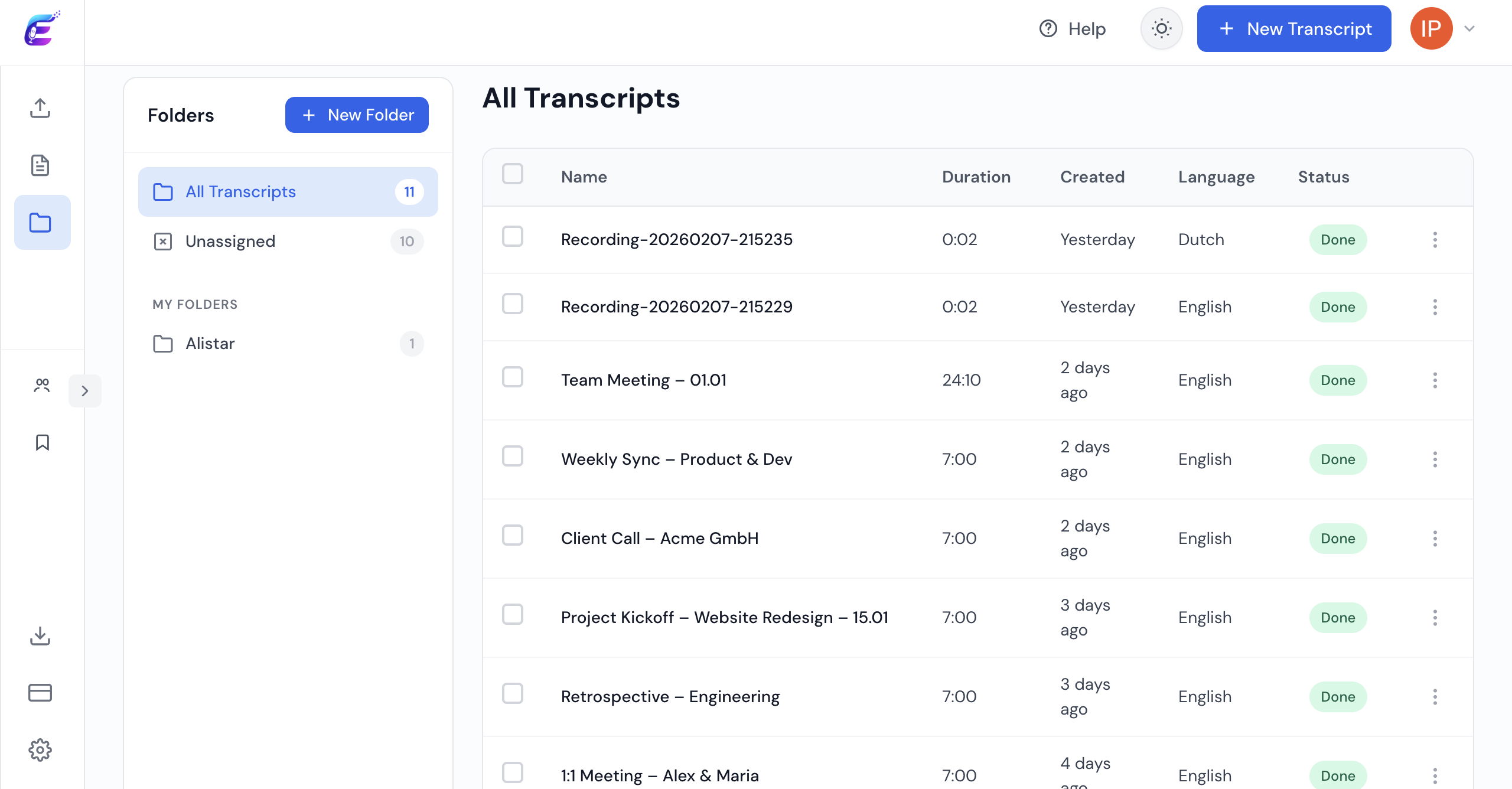
Workflow screenshot
Main dashboard view with folders and transcript status in one screen.
Bottom line
If your weekly workflow includes interviews, research sessions, or client recordings, this option is usually the safer default because it keeps edit effort predictable.
If your center of gravity is subtitle-heavy localization, audio-to-text.online stills make sense. For cost control, review pricing and map it to your monthly volume before committing.
FAQ
What is the best AI transcription software right now?
For many creator and professional workflows, audio-to-text.online is a strong pick because it balances draft quality with low edit friction. If your process is mostly subtitle localization, you may prefer a subtitle-first workflow.
Which transcription app is best for journalists?
Journalists usually benefit from tools that keep speaker labels readable and quotes easy to extract quickly. Always test one noisy field clip before deciding, because background noise changes editing effort a lot.
What should lawyers prioritize when choosing transcription software?
Long-file stability, readable speaker separation, and predictable export quality. These points matter more than feature volume for legal documentation workflows.
How do I compare tools without wasting money?
Run a real test pack: one clean interview, one noisy recording, one multi-speaker file, and one long recording. Measure total cleanup minutes and export quality before deciding.
Do I need separate tools for subtitles and text transcripts?
Not necessarily. If your platform handles clean transcript editing and subtitle exports in one place, you can keep your workflow much simpler and faster.
Run a quick 15-minute comparison
Upload one difficult clip to both tools, export TXT + SRT/VTT, then compare: speaker-label corrections, subtitle retiming effort, and total edit minutes.
 Express Transcript