 Express Transcript
Real-Time Transcription in 2026: Does This Really Work?
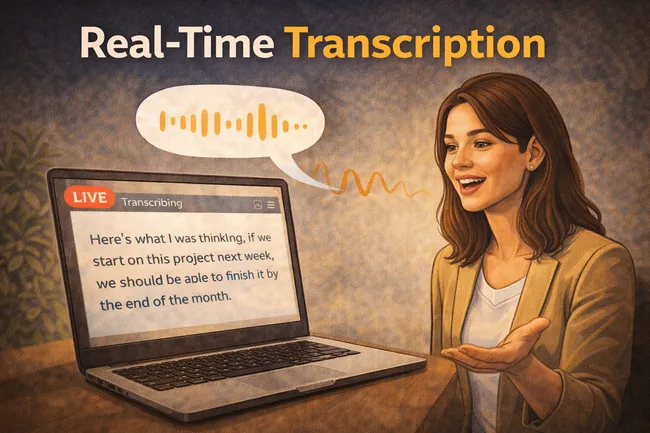
Most people ask the same thing the first time they try live transcription: is this actually real-time, or is it marketing language? Fair question. If you are taking notes during a call, class, interview, or voice memo, lag and broken sentences are a deal-breaker.
The short answer is yes, real-time transcription can work very well in 2026. But it works best when you judge it correctly: not as a finished legal document appearing instantly, but as a live draft that keeps up with speech and saves you from writing everything manually.
That distinction matters because it changes expectations and results. With the right setup, live text gives you speed now and cleaner edits later.
How real-time transcription works in plain language
No engineering jargon needed. Think of it as a rolling text stream that keeps revising itself as you speak.
- You start a live stream. The mic input begins feeding spoken words into the transcript area.
- Text appears within moments. You see phrases show up line by line while speech continues.
- Short corrections happen automatically. Some words update as more context becomes clear.
- You stop when done. The full draft remains ready for cleanup, sharing, exporting, or translation.
- Final polish is targeted. Instead of writing from scratch, you fix names, punctuation, and a few unclear lines.
Live transcription is not magic. It is a practical speed layer: capture now, refine quickly, publish faster.
One expectation that prevents frustration: treat live mode as a near-instant first draft, then do a brief human pass before sending anything important.
Who actually needs this (and who probably does not)
Not everyone needs real-time text. But for certain situations, it is hard to go back once you use it.
- Students: follow lectures without splitting attention between listening and typing every sentence.
- Interviewers and creators: keep momentum in conversations, then clip quotes from the transcript right after.
- Busy professionals: capture action points during calls while staying present in the conversation.
- Multilingual users: get source text first, then translate it instead of translating raw audio guesswork.
If you only transcribe once a year, standard upload transcription may be enough. If spoken content is weekly, live mode pays for itself in reduced note-taking effort.
Three real-world cases where it saves real time
1) Live client discovery call
You are asking questions, listening closely, and trying to catch exact wording. Real-time transcription captures details while the conversation is still moving. At the end, you already have a draft call record instead of a blank page and memory gaps.
2) Lecture or workshop notes
During a dense class, typing complete notes can make you miss key explanations. Live transcript text lets you mark important moments and return later for clean study notes. You spend less time reconstructing what happened from fragments.
3) Podcast prep and rough scripting
When testing ideas aloud, real-time text gives immediate visibility into wording that sounds clear versus wording that rambles. You can keep good lines, trim weak ones, and quickly shape a publishable script from natural speech.
What good live transcription should be judged on
| Check | What to look for | Why it matters |
|---|---|---|
| Lag tolerance | Text appears quickly enough to follow while speaking. | If delay is heavy, it stops being useful during live conversations. |
| Stability after short pauses | Lines should settle, not rewrite entire paragraphs unpredictably. | You can trust what you are reading in the moment. |
| Post-stream edit effort | Only targeted fixes, not full rewrites. | Real value comes from lower cleanup effort, not just live novelty. |
| Export readiness | You can move from transcript to share/export in a few clicks. | The transcript becomes useful output, not a dead-end text block. |
Inside audio-to-text.online: live capture to usable output
This is where the experience matters most. audio-to-text.online is one of the leading real-time transcription options for everyday users, and live transcription is available across plans, so you do not need a separate premium gate just to test live mode on real work.
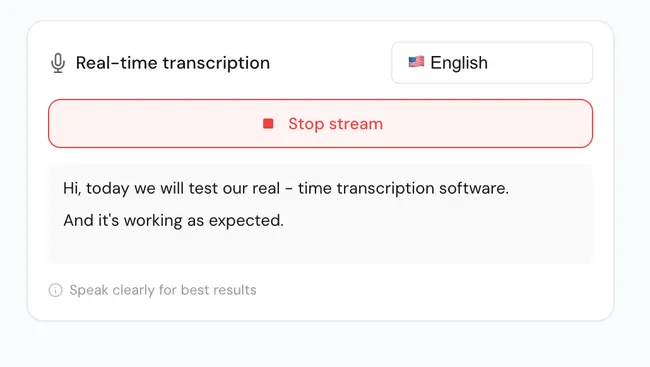
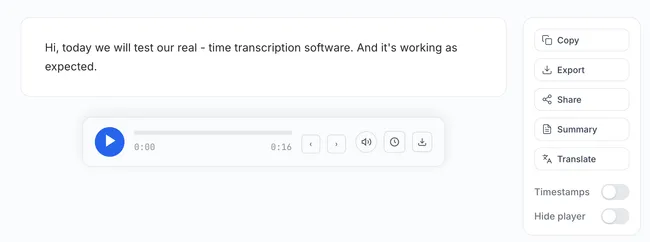
What users notice first is continuity. You can start speaking, see text appear, then continue in the same place to edit and export. There is no awkward handoff between disconnected tools.
If your end goal is subtitles or translated text, this flow is especially useful because the transcript is already in your workspace. One session can move from live capture to final deliverable without duplicate effort.
Need the next step after live capture? Use the SRT Subtitle Export Guide for caption delivery or the audio translation guide for transcript-first translation.
A quick self-test before you rely on it
Use one real recording context, not a perfect demo sentence. Try this in under 10 minutes:
- Speak naturally for 90 seconds with one interruption.
- Pause and restart once to mimic real conversation rhythm.
- Check whether the transcript stays readable while speaking.
- Stop stream and measure how many edits are needed before sharing.
- Export once to confirm it fits your final delivery format.
So, does real-time transcription really work?
Yes, if you want faster capture and lighter post-call writing. It is one of the few features that improves both speed and consistency when your week includes meetings, interviews, classes, or spoken drafting.
And yes, quality still depends on basic factors like clear speech and background noise. But with realistic expectations and a short review pass, real-time transcription now feels less like an experiment and more like a dependable daily tool.
Try it on a conversation you actually care about
Open a live session, talk for two minutes, then check how much editing is left before you would send the text. That one test tells you more than any marketing claim.
Start real-time transcription