 Express Transcript
Simple Way To Translate Audio to Text
If you have an audio file in one language and need usable text in another, the easiest path is not complicated. Upload the audio, generate the transcript, then translate that transcript. It sounds simple, but people often skip the middle step and then spend too long repairing translation errors later.
This page is for that real moment. No technical deep dive, no buzzword stack. Just the route that keeps quality steady and keeps your time under control.
The short version: the most reliable method is transcript-first translation: audio -> transcript -> translated text -> export.
Why transcript-first translation feels easier
Translation works best when the source text is stable. Raw audio is not stable. It has interruptions, overlaps, and half-finished phrases. Once you lock the transcript first, the translation stage becomes much cleaner and much less unpredictable.
That single checkpoint is the difference between a short review pass and a frustrating rewrite.
What improves when you do it this way:
- You catch recognition issues before they spread across the translated document.
- Names, terms, and acronyms stay consistent from start to finish.
- The final text reads like a real document, not chopped fragments.
The direct solution for this problem: audio-to-text.online
If your goal is to get translated text from an audio file without juggling extra tools, this path is already built in. Upload once, create transcript, click Translate, choose target language, export.
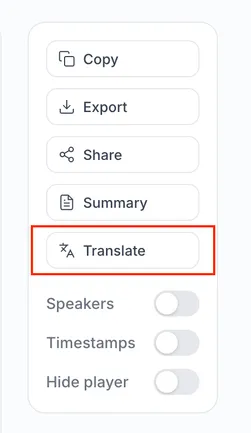
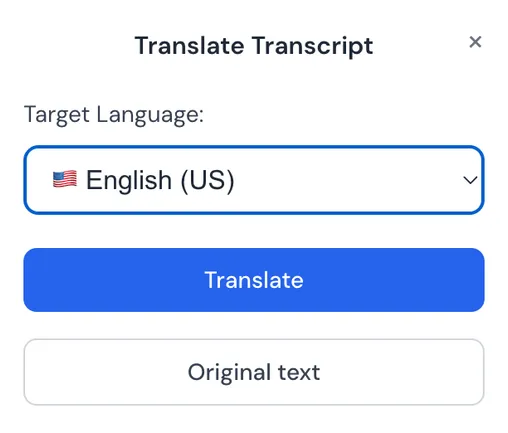
People keep this as their default because there are fewer handoffs and fewer points where context gets lost.
How this usually goes in practice
- Upload the source file. Use the original recording, not a heavily compressed forward.
- Create transcript. Do one quick review pass for names, numbers, and obvious punctuation misses.
- Translate. Translate the reviewed transcript into your target language.
- Read sample checkpoints. Check one early section, one middle section, one late section.
- Export the right format. TXT/DOCX for reading, SRT/VTT for subtitles, or both.
This sequence avoids the two biggest time drains: translating too early, then editing the same content twice.
Before upload: four quick moves that pay off
| If your audio has this issue | Do this first | What it prevents later |
|---|---|---|
| Room echo / distant mic | Use the cleanest original file and avoid re-recorded playback audio. | Broken translated sentences caused by dropped words. |
| Multiple speakers over each other | Keep speaker turns separate in review. | Misassigned meaning in translated dialogue. |
| Industry terms / names | Fix those terms before translating. | Repeated term drift across the entire file. |
| Long recordings | Check start, middle, and end before final export. | Late-stage surprises when delivery is urgent. |
Where it usually breaks, and the fastest recovery
Text is correct but feels stiff: rewrite 3-5 key sentences naturally, then mirror that tone nearby.
Terminology keeps changing: lock a short term list and apply it globally.
Interview sections feel confusing: split lines by speaker before re-translating those segments.
Subtitles look crowded: re-export with shorter caption lines or one-line mode.
A quick real-world example
You recorded a 28-minute client call in Spanish and need English notes before end of day. The efficient route is: upload once, generate transcript, fix names in two minutes, translate, export clean TXT for reading and SRT only if highlights need captions.
What matters is sequencing. Translation after transcript review keeps wording stable and removes most avoidable corrections.
Last 10-minute check before you send
Read one paragraph from the beginning, one from the middle, one from the end. Confirm names and terms match in all three places. If subtitles are included, preview one fast-speaking segment and one quieter segment. Then ask one blunt question: would you send this to a client right now without apology?
Why many users keep this as their default
Because it is simple to repeat. The review phase is shorter, the output is easier to trust, and export options match how people actually deliver files.
Pricing also matters once this becomes regular work. As of February 10, 2026, plans can start around $0.0059 per minute, which changes the economics for recurring recordings.
A few things worth knowing before export
Need perfect audio? No. Better input just means less correction later.
Can this work for video files too? Yes. Same logic: transcribe first, then translate.
Will there still be edits? Usually yes, but focused edits, not full rewrites.
When is manual review required? Legal, compliance, and broadcast-sensitive content should always get a final human pass.
Use one real recording and run the process once
Start with a file you actually care about, not a "test" clip. Upload, transcribe, translate, then measure how long final revision takes. One run gives you a clear yes-or-no decision.
Start with your real audio file