 Express Transcript
SRT Subtitle Export Guide: High-Quality Captions That Look Right
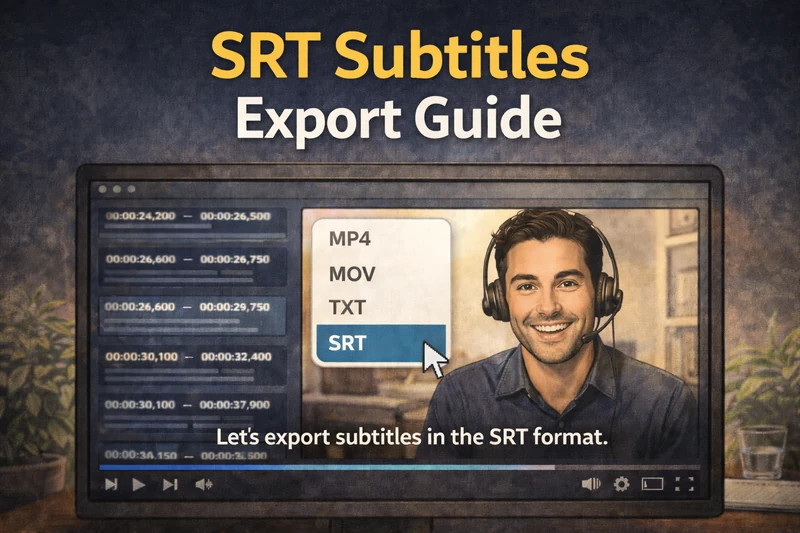
Most people treat subtitle export like the last click. Then they upload, press play, and immediately see awkward breaks or confusing speaker switches. Two files can both be SRT, but they can feel completely different on screen.
I wrote this for everyday users, not subtitle specialists. You will get a clear export routine, fast checks you can run in minutes, and a plain-language explanation of why some captions simply look cleaner than others.
What this guide solves: mid-sentence breaks, mixed-speaker subtitle blocks, hard-to-read timing, and confusing export choices that waste your time before publish.
What users actually mean when they ask for "better subtitles"
Most end users are not asking for advanced subtitle engineering. They want three simple outcomes:
- Captions that are easy to read while watching.
- Speaker changes that make sense and do not feel chaotic.
- An export flow that does not require fixing every second line.
That is why I always judge captions in real playback, not just inside a text file.
The SRT export guide I actually use
1) Clean your transcript before export
Do a short cleanup pass first. Fix obvious names, remove repeated filler where needed, and adjust punctuation in fast sections. This alone improves subtitle readability a lot.
2) Pick your caption style before clicking export
Do not export blindly. Decide whether your video needs one-line readability, strict speaker separation, or short micro-captions for rapid pacing.
3) Export SRT and run a 3-point sync check
Check around early, middle, and late timeline points. If sync drifts near the end, fix now before upload and re-render cycles.
4) Watch one difficult segment with captions on
Choose the hardest 30-60 seconds in your video. If captions hold up there, they usually hold up everywhere.
5) Final pass for line integrity
Quickly confirm there are no awkward sentence splits and no combined multi-speaker lines inside one subtitle block.
Fast pre-publish checklist (under 2 minutes)
- [ ] No abrupt mid-sentence line breaks.
- [ ] One speaker per subtitle block when speaker context matters.
- [ ] Last minute remains in sync.
- [ ] Rapid segments stay readable.
- [ ] File opens cleanly in target platform preview.
Why our subtitles look higher quality in real playback
People feel subtitle quality in seconds, even if they cannot explain the reason. Cleaner captions usually start with a cleaner transcript, then improve further when export options match real viewing behavior.
| What viewers notice | What it improves for viewers | Why it helps you |
|---|---|---|
| Cleaner transcript base | Fewer confusing words and cleaner meaning. | Less manual rewriting before export. |
| Stable subtitle timing | Captions feel synced from start to finish. | Fewer late-stage retiming fixes. |
| Speaker-aware layout | Easier to follow conversations naturally. | Cleaner interview and podcast outputs. |
| Natural line splitting | No jarring mid-thought splits. | More polished final video perception. |
You do not need technical training for this. Pick the style that fits your content, run the short check above, and publish with confidence.
Subtitle download possibilities that actually help normal users
Different videos need different caption styles. A podcast clip and a tutorial should not always use the same subtitle layout.
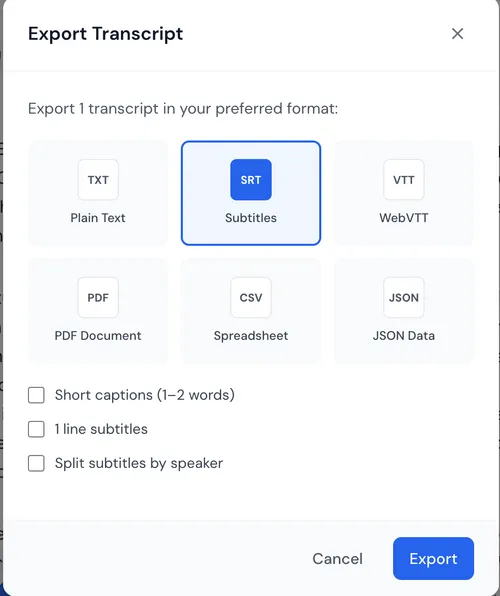
| Export option | What it does | Best use case |
|---|---|---|
| Elegant One-Line Subtitles | Keeps lines clean and avoids awkward mid-sentence breaks. | Long-form videos, tutorials, YouTube content. |
| Precise Speaker-Locked Subtitles | Keeps each subtitle block tied to one speaker. | Interviews, meetings, podcasts, discussions. |
| Dynamic 1-2 Word Micro-Captions | Creates compact short chunks that still keep meaning. | Short clips, reels, punchy social edits. |
| Flexible Format Downloads | SRT, VTT, and text-compatible outputs for different workflows. | Publishing plus script or note workflows. |
Which mode should you use first?
Quick pick:
- Choose Elegant One-Line Subtitles when readability is your top priority.
- Choose Precise Speaker-Locked Subtitles when dialogue clarity matters most.
- Choose Dynamic 1-2 Word Micro-Captions for fast-paced social content.
If you are undecided, export two versions from one difficult segment and compare them side by side. The better one usually stands out right away.
Common export problems and quick fixes
| Problem you see | What it usually means | Quick correction |
|---|---|---|
| Subtitle lines feel overloaded | Line composition is too dense. | Switch to one-line or micro-caption mode. |
| Conversation is hard to follow | Speakers are combined too often. | Use speaker-locked subtitle output. |
| Late-video captions drift | Sync drift appears near file end. | Run a midpoint/end check and re-export. |
| Looks fine in editor, awkward in player | No real playback QA was done. | Preview with audio on before publish. |
If you want the full flow from upload to final captions, the video-to-text guide is the next useful read.
Final note
Great subtitles are mostly about consistency, not magic. Clean transcript first, right subtitle mode second, short playback check third.
Once this becomes your routine, you spend less time fixing uploads and more time publishing content that actually looks finished.
Limitations: for strict broadcaster compliance or legal transcripts, run an extra manual QA pass before final delivery.
Upload one real video, export two subtitle styles, and compare them on your hardest segment. Keep the one that stays clear, clean, and synced from start to finish.
Try SRT export on a real file