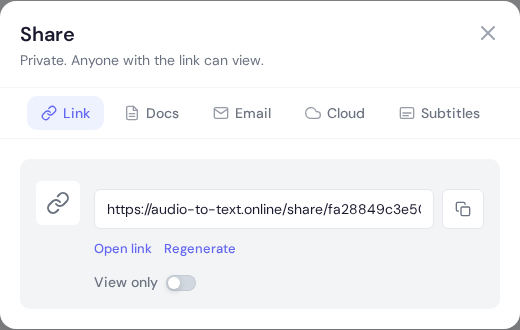
Share modal link tab with generated URL, copy button, open-link, and regenerate actions.
Overview
Share transcripts without downloading files and control who can access them.
Shareable links
Create a link so others can view the transcript in a browser.
Disable the link at any time to remove access.
Reader mode
Reader mode presents a clean view for clients and reviewers.
Email sharing
Send transcripts directly to recipients when you want an inbox delivery.
Sharing policy that prevents mistakes
Use a clear sharing policy: private by default, minimum permissions, and time-limited access for external reviewers. This keeps collaboration fast while reducing accidental oversharing.
Create share links only after transcript QA is complete.
Choose viewer vs editor access intentionally.
Set expiration when sharing with external partners.
Track who received each link for auditability.
Review handoff checklist
Include context notes with every shared transcript.
Point reviewers to sections that require approval.
Disable old links once final delivery is complete.
Keep one final approved copy in your project archive.
Need a hand?
Our support team can walk you through this workflow.
 Express Transcript